How to start clipping in India: your first paid clip, step by step
To start clipping in India, you need a phone, one public Instagram or YouTube account, a free editing app and a UPI ID. Join a clipping platform for free, read a campaign brief, cut the brand's footage into a vertical clip, post it from your own account, submit the link, and withdraw approved earnings to UPI. You need no followers.
What do you need to start clipping in India?
To start clipping in India you need a phone, one public Instagram or YouTube account to post from, a free editing app and a UPI ID for payouts. Most platforms also require you to be 18 or over, and Musubi requires you to be based in India, as its terms set out.
You do not need:
- Followers. Campaigns pay for approved views.
- A laptop or paid software.
- TikTok. It has been blocked in India since 29 June 2020, according to the Press Information Bureau.
- Money up front. Joining Musubi is free, and an offer that asks you to pay before you can earn is a warning sign.
Musubi publishes this guide. It is an Indian marketplace where brands pay creators per 1,000 verified views on Instagram Reels and YouTube Shorts, and one of the platforms named below. New to the idea? Read what clipping is first, or our guide on how to make money clipping in India for rates and platforms in depth.
Step 1: Pick a niche and a platform
Pick one niche you would watch anyway, such as food, tech, fitness, money or education, and one platform to start on. One niche gives your page a clear identity, so a viewer who liked one clip has a reason to watch the next.
For the platform, start where you already scroll. Each brief names the platform it pays for, and Musubi pays on both. The rules that matter for a first clip:
| Instagram Reels | YouTube Shorts | |
|---|---|---|
| Length | Up to 20 minutes, but Reels over 3 minutes are not recommended to new audiences | Up to 3 minutes |
| Shape | 9 by 16 vertical, high resolution, no borders | Square or vertical |
| What hurts reach | Visible watermarks, blurry video, reposted copies | A Short over one minute with a copyright claim is blocked globally |
Sources, read 25 October 2026: Instagram Help, Instagram's tips for creators and YouTube Help.
Step 2: Set up a dedicated clipping account
A clipping account is a separate page that posts only clips in your niche. Keep it apart from your personal profile, so a new viewer sees one clear page.
You can start clipping with no followers: Musubi, INDclipping and Dashrize each state that there is no follower minimum. A new page simply starts small, because Instagram first shows eligible content to "a small audience", according to its originality page.
| Part | Do | Avoid |
|---|---|---|
| Handle | Your niche plus a word like "clips", easy to spell | The brand's name, or "official" |
| Bio | One line on what the page posts | Earnings claims, links to paid groups |
| Profile photo | A simple original mark | The brand's logo |
| Account type | Public; on Instagram, a free creator or business account | Private, since views cannot be read |
Then verify the handle with your clipping platform. On Musubi you do this once, before your first submission, by putting a short code from the app in your Instagram bio or YouTube channel description. INDclipping also uses a bio code, according to its terms.
Do not warm up the page by reposting other people's videos. Instagram stops recommending accounts that post content they did not create or materially improve 10 or more times in 30 days, and reposting without permission can break copyright law. Our guide on whether clipping is legal in India explains the line.
Step 3: Choose a free editing app
One free phone editor is enough. YouTube Create suits Shorts, Edits suits Reels, and VN and Adobe Premiere export without a watermark on their free tiers. CapCut is not available in India, so skip any guide that tells you to install it. Our list of the best free apps for clipping videos compares six editors.
Step 4: Find a clipping campaign to join
To get your first clipping campaign, join a platform that lists live campaigns, verify your account and pick one brief you can make today. How five platforms treat a beginner, each read on its own pages on 25 October 2026:
| Platform | How you join | Follower minimum | Minimum withdrawal | Fee on the creator | Pays to |
|---|---|---|---|---|---|
| Musubi | Free sign up, verify your handle once | None | ₹10 | 5 percent of each withdrawal | UPI, within 48 hours of a request |
| INDclipping | Bio code; some campaigns ask for a short application | None | ₹500, after approved views on a campaign reach 5,000 | None; brands pay its commission | UPI, NEFT or IMPS |
| ClipConnect | Profile, quick KYC and UPI details | Not published | ₹500 | 10 percent at withdrawal | UPI |
| Dashrize | Waitlist with an invite code | None | ₹500 on its home page, ₹2,000 in its terms | 15 percent of gross earnings | UPI or bank |
| Whop Content Rewards | Open campaigns, or apply | Not set platform wide | Brands may set a minimum per clip; $10 on a Whop withdrawal "if applicable" | 10 percent | A bank account after KYC; no UPI listed |
Sources: Musubi, INDclipping, ClipConnect, Dashrize, Content Rewards and Whop.
Whop is the global option, and many of its briefs are not built for India: on 25 October 2026, 9 of the 81 live campaigns on Content Rewards paid for TikTok alone. Our guide to Whop clipping in India covers its payout route.
Before you join, check that the platform is free to join, shows the rate and cap before you post, pays to your own UPI ID or bank, and publishes its minimum, fee and operator. Our guide on how to tell if a clipping offer is real or fake has the full check, and the best clipping platforms in India compares eight.
Step 5: Read the brief before you cut anything
A campaign brief is the brand's rulebook for the clip, and reading it first is the cheapest way to avoid a rejection. On Musubi a campaign is either clipping, where you cut the brand's footage, or UGC, where you make original content, and both pay per 1,000 verified views, as Musubi's about page says. Our guide to UGC vs clipping explains the difference.
| Brief field | What it tells you | What to do |
|---|---|---|
| Platform | Reels, Shorts or both | Post only where it pays |
| Rate per 1,000 views | What approved views earn | Compare briefs, not averages |
| Cap per clip | The most one clip can earn | Start a new clip once one reaches it |
| Budget left | When the campaign stops paying | Skip a brief that is nearly spent |
| Footage | What you may cut | Use nothing else |
| Rules | Length, tags, caption, logo, approved claims | Tick each one before you post |
The brand sets the rate on each brief. On Musubi no campaign can pay less than ₹30 per 1,000 views, which is a floor, not a typical rate.
Step 6: Make your first clip
A first clip that gets approved does exactly what the brief asks and holds attention from the first frame:
- Use only the footage the brief gives you. That permission is what makes the clip lawful and payable.
- Find one moment that stands alone, such as a claim, a reaction or a reveal, rather than a summary.
- Put the hook in the first 2 seconds. Open on the strongest line, not an introduction.
- Add captions and proofread them. Auto captions mishear names, brands and Hinglish.
- Cut to the length the brief asks for.
- Export 9 by 16 at 1080 by 1920, with no watermark. Instagram says not to post blurry or watermarked reels.
- Add the logo, caption and tags the brief asks for, and make only the claims it approves.
Step 7: Post the clip and submit the link
Post the clip from the account you verified, keep it public, and add the caption and tags from the brief. Then copy the post link and submit it on the campaign page; the link is your entry. On Musubi you hold one clip per campaign at a time, as the contact page explains, so your next clip goes to another campaign.
Keep the post up, public and unchanged while it earns, because views are read from the post itself. Other platforms add their own rules: Content Rewards wants the link within 30 minutes of posting, according to its creators page.
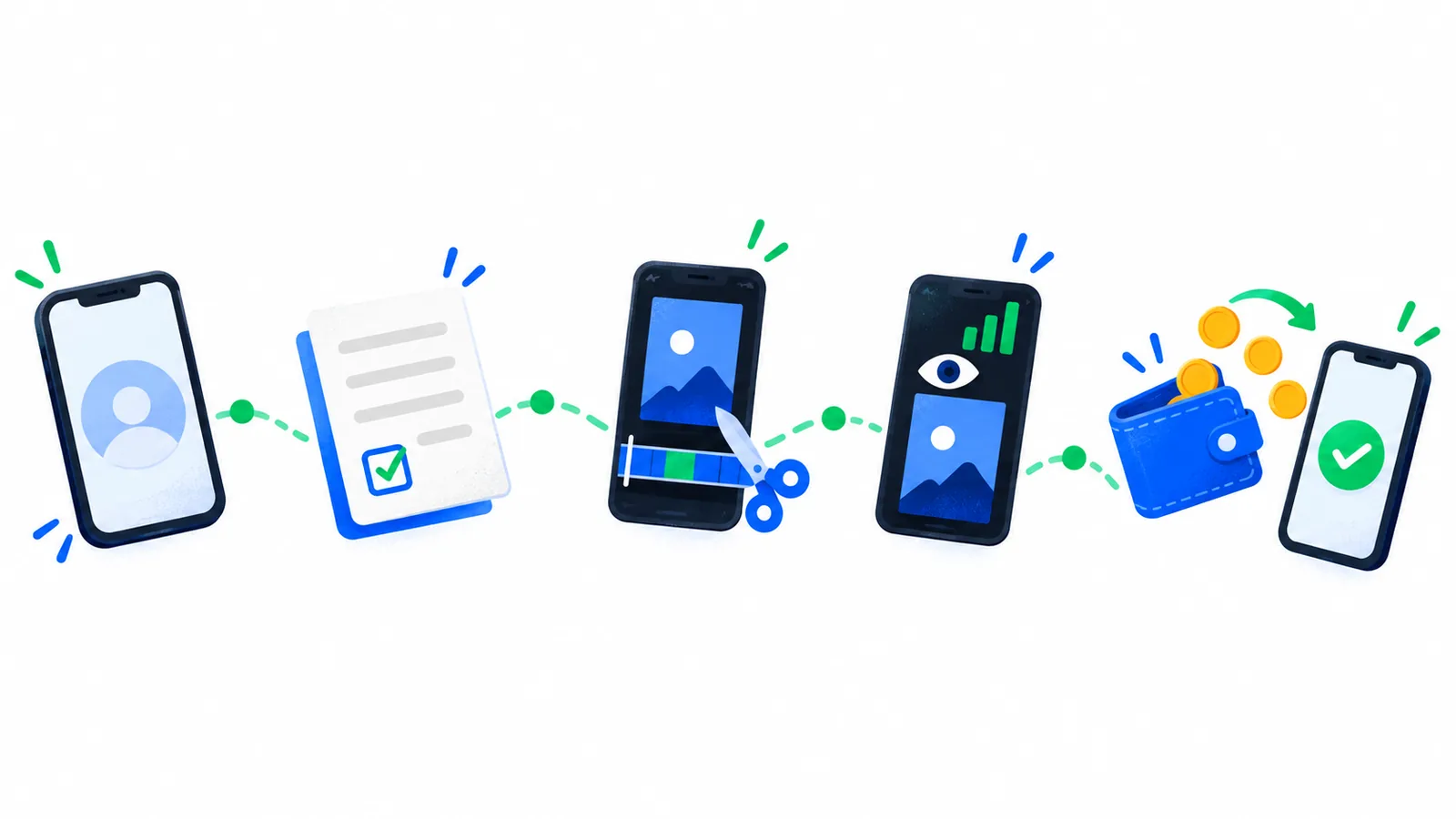 Set up one account, read the brief, cut and post the clip, and approved views become a withdrawal to your UPI ID.
Step 8: How are your views counted and reviewed?
On Musubi, views are read from your post every night, checked against the handle you verified, and then checked by a person, as Musubi's home page and brands page describe. You never type in a view count, every clip is reviewed before it is paid, and a clip posted from another account is rejected.
Your pay on a clip is its approved views ÷ 1,000 × the rate on the brief, up to the cap per clip, while the budget lasts. For example, at the ₹30 floor, 10,000 approved views earn ₹300. That is arithmetic, not a forecast. A platform's count can trail your Instagram or YouTube app, because it is read on a schedule, not live.
Step 9: Withdraw your earnings to UPI
On Musubi, the earnings from an approved clip move to your wallet. Save your UPI ID in settings, request a withdrawal of ₹10 or more, and Musubi sends it within 48 hours of the request. A 5 percent fee is shown before you confirm: withdraw ₹200 and ₹190 reaches your UPI ID. If a payout fails, the terms say it returns to your wallet to withdraw again once your UPI ID is corrected. Clipping income may need to go in your income tax return; this is not tax advice.
Why do first clips get rejected?
Most first clips are rejected for missing something in the brief, and each reason has a direct fix. On Musubi, a reviewer picks one of seven reasons and you see a plain sentence saying what to change:
- Off brief. Read the brief again and cover what it asks for.
- Branding missing. Add the brand's logo or watermark where the brief says.
- Reused clip. It was already submitted, by you or someone else. Make an original cut.
- Misleading claim. Say only what the brief lists as approved.
- Quality below the bar. Fix the light, the sound or a blurry export.
- Wrong product. Check which product the brief is about.
- Views not genuine. Views from anything but real viewers cannot be paid.
A rejection frees your slot, so you can submit a new clip to the same campaign while it is live. A suspension is different: Musubi's terms suspend accounts and forfeit pending earnings for fake views, bots, view exchange, multiple accounts, clips you did not make and copyright infringement.
What should you do in your first week?
Your first week of clipping is about finishing one clip end to end, not about volume:
| Day | What to do |
|---|---|
| Day 1 | Set up the account and bio, and verify your handle |
| Day 2 | Read three briefs in full and pick one with budget left |
| Day 3 | Cut two or three versions of one moment and keep the best |
| Day 4 | Post it and submit the link |
| Days 5 and 6 | Start a clip for a second campaign |
| Day 7 | Check the review; if rejected, fix that one reason and resubmit |
Note what you changed between versions; after a few clips, that note shows what holds viewers in your niche.
What to expect from your first clips
Expect your first clips to earn little, possibly nothing, while you learn what briefs and viewers want. Pay is approved views times the rate on each brief, up to its cap, and a new page starts with a small audience. Nobody can tell you in advance how many views a clip will get, and no platform can promise a monthly income.
Be wary of pages that pair a low rate with a large monthly figure, and of courses selling "guaranteed" income. Clipping is campaign work paid per approved view, not a salary. In Hindi or Hinglish, read clipping se paise kaise kamaye; for everything else, see our full guide on how to make money clipping in India.
Questions creators ask
Do I need a laptop or paid software to start clipping?
No. A phone and a free editor are enough to make Instagram Reels and YouTube Shorts. YouTube Create, Edits, VN and Adobe Premiere are free to download, and VN and Premiere export without a watermark on their free tiers. CapCut is not available in India, so pick one of these instead. A laptop can help with long footage, but you can start without one.
Do I have to show my face to start clipping?
No, not for a clipping campaign. Clipping means cutting the brand's own footage, so your face and voice never need to appear. A UGC campaign is different: it asks for original content, which can mean filming yourself or recording a voiceover. The brief says which type a campaign is, so read it before you join and pick the type you are comfortable making.
Can I start clipping if I am under 18?
Not on the platforms that publish an age rule. Musubi, INDclipping, Dashrize and Whop's Content Rewards all require you to be 18 or over, and Content Rewards says this applies even with a parent's consent. Do not sign up with a parent's details to get around the rule; Musubi's terms, for example, require accurate information at sign up and allow one account per person.
Can I make clips in Hindi or another Indian language?
Yes, if the brief allows it. Each brief says which language a campaign wants, and some ask for English only, such as Content Rewards briefs aimed at US or UK audiences. Match the captions to the language spoken in the clip and proofread them, because auto captions often mishear Hinglish and regional words. When a brief says nothing about language, ask before you post.
Can I join more than one clipping platform?
Yes. You can sign up on two or three clipping platforms, verify your account on each, and pick the briefs that suit you best. Read each platform's terms for any exclusivity rule before you start. Make a separate, original clip for every campaign you enter, because Musubi rejects a clip that has already been submitted, by you or by someone else, as a reused clip.
Start earning
Pick a live campaign, post your clip, and get paid for the views it gets.
Start earning